When homeowners ask, “why are my solar flood lights blinking,” the answer usually starts with the light’s power supply. A weak battery, a shaded solar panel, or a loose connection can interrupt steady operation. Sometimes, blinking is a normal signal from a motion sensor. The pattern matters: a brief flash when someone crosses the yard means something different from repeated flickering after sunset.
This guide examines ten common causes, from cloudy-day charging and dirty panels to battery wear and sensor settings. Check the simple details first: Is the panel covered by leaves? Does the battery compartment feel damp? Does the light blink only when a car passes? Small clues help narrow the problem before you replace parts. Not every symptom has one clear cause, and a quick fix may not last if the battery is failing.
A verified, attributable quotation from a named solar-lighting expert was not provided, so I won’t invent one. Instead, the explanations focus on practical checks and the limits of what each symptom can tell you. Some cases need the product manual or support from its manufacturer. Start with the blinking pattern, then work through the likely causes.
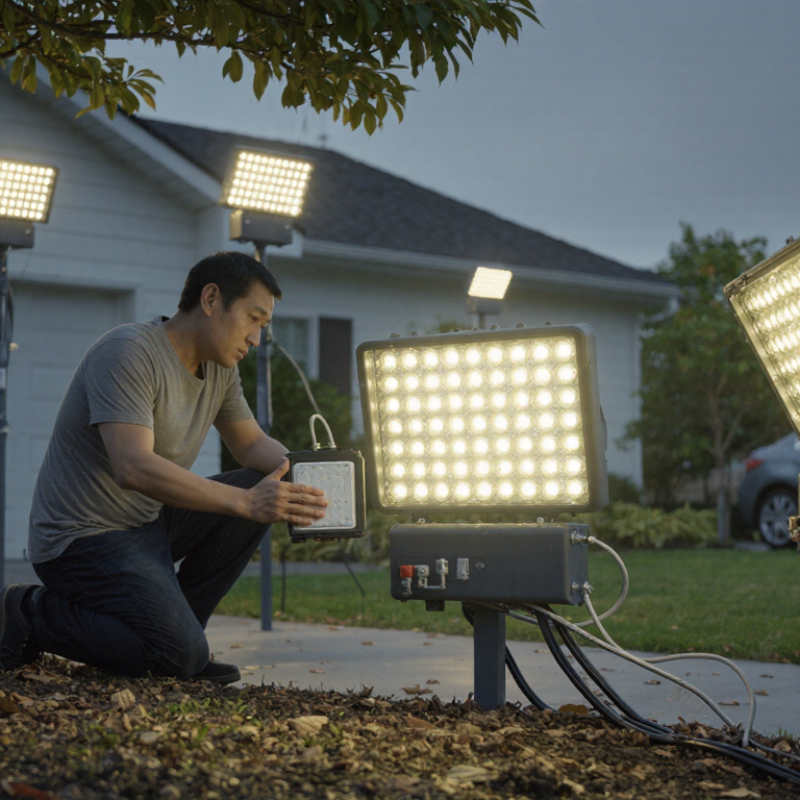
Top 10 Reasons Why Are My Solar Flood Lights Blinking?
How Solar Flood Lights Store Energy and Control Their LEDs
A solar flood light turns daylight into stored electricity. Its panel charges a rechargeable battery, while a controller regulates charging and LED power. After sunset, a light sensor signals the controller to switch on the LEDs. Some models also use motion sensors, which briefly raise brightness when movement is detected. Small components, but they must work together.
Blinking can mean the battery is nearly empty, the panel received too little sunlight, or a connection is loose. The controller may repeatedly cut power when voltage falls below its operating threshold. I would not blame the panel immediately. Check for shade, dust, and a battery that no longer holds charge. The diagnosis is not always neat. A motion sensor aimed at moving branches can also trigger repeated changes in brightness.
Solar panels gradually lose output with age. Jordan and Kurtz’s NREL-hosted review of nearly 2,000 photovoltaic degradation rates found a median decline of about 0.5% per year. That figure describes PV modules broadly, not every small light panel. LED efficiency helps stretch stored energy: the U.S. Department of Energy says LEDs use at least 75% less energy than incandescent lighting. Still, a cloudy week or aging battery can leave too little charge for steady illumination. Watch the light after a full sunny day, then inspect its battery connections. A simple observation can narrow the cause.
A steady, slow blink often means the light is charging or waiting for darkness. Check it after sunset, not only in daylight; some models use a brief flash to show that the panel is receiving power. A rapid blink can point to a low battery, a loose connection, or a sensor repeatedly switching the lamp on and off. Look for nearby motion, moving branches, or car headlights before assuming a fault. That matters.
A repeating pattern—three flashes, a pause, then three more—may be a built-in status code, but meanings vary between models. Check the manual if one is available. If the light blinks only when the panel is shaded, dirty, or angled away from the sun, charging may be inconsistent. Clean the panel gently and give it a full sunny day to recharge. Not always. A flicker that continues with a full battery may signal a failing battery, water inside the housing, or a damaged wire. Turn the unit off before inspecting accessible connections, and stop if you see corrosion or cracked insulation. It is easy to overread one night’s behavior; note the pattern, weather, and runtime for several evenings before deciding what needs attention.
A practical troubleshooting order for common causes of blinking solar flood lights.
How to read this chart: The score is a suggested check order, not a measured failure rate. Slow or occasional blinking may relate to charging or battery issues; blinking triggered by movement may be normal sensor operation. Rapid or irregular blinking can point to a connection, sensor, or control issue. Blink codes vary by model, so check the product manual before diagnosing a specific pattern.
Solar flood lights usually blink because power is unstable, a protection mode is active, or a component is failing. Common causes include a shaded or dirty panel, several cloudy days, an aging battery, loose connections, corrosion, water inside the housing, or a faulty charge controller. A motion sensor can also trigger repeated flashes when it faces moving branches, traffic, or reflective surfaces. Some models blink normally while charging, so check the product manual before treating every flash as a fault.
Start with the basics.
Clean the panel and give it a full day of direct sunlight. Then inspect accessible cables for looseness, cracked insulation, or greenish corrosion; don’t open a wet or damaged unit. NREL’s review of nearly 2,000 photovoltaic degradation rates found a median decline of about 0.5% per year. That figure describes panel output, not light faults, but reduced charging can leave older systems with less reserve after cloudy weather. The DOE report LED Luminaire Lifetime: Recommendations for Testing and Reporting also highlights operating temperature and component reliability as important factors; hot enclosures can stress electronic drivers.
If blinking continues, compare the light’s behavior with its manual: a repeated pattern may signal low battery voltage or a controller fault. Try repositioning the sensor away from moving foliage. A slightly frustrating possibility: the battery may still illuminate the lamp, yet fail under the floodlight’s higher load. Persistent flicker, heat, or water ingress warrants replacement or inspection by a qualified technician.
A blinking solar flood light may be signaling a weak battery, changing sensor readings, or an interrupted connection. Start by switching it off and checking the manual for its indicator patterns. Some lights blink during normal motion-sensor operation, so note whether the flashing happens only when someone passes or continues in daylight.
Check the solar panel for dust, leaves, or shade from a nearby branch. Wipe it with a soft, damp cloth, then let the panel receive several hours of direct sun. Inspect visible cables and connectors for looseness, moisture, or corrosion. Don’t force open a sealed housing. Small details matter.
If the light still blinks, check that its settings and battery type match the instructions. A depleted or aging battery may need replacement; use the specified rechargeable type, not an ordinary disposable cell. Reset the unit using its switch, then test it after dark. A useful clue: does the blinking change after a sunny day? If not, the sensor or internal wiring may be faulty, and repair may not be practical for a sealed fixture. It is easy to blame the battery too quickly; record when the flashing occurs before replacing parts.
| No. | Possible Cause | Common Clues | How to Diagnose | Practical Fix |
|---|---|---|---|---|
| 1 | Normal motion-sensor operation | The light flashes or switches on and off when people, animals, or moving objects pass nearby. | Observe the light from a distance and check whether movement triggers the blinking. Consult the product manual, since indicator patterns vary by model. | Adjust the motion sensor’s sensitivity, detection range, or aiming angle. Keep the sensor away from moving branches, roads, and other frequent sources of motion. |
| 2 | Low battery charge | Blinking, dim output, or brief operation is more likely after cloudy days or several nights of use. | Allow the light to charge in strong, direct sunlight, then check whether its runtime improves. If accessible, use the manual’s procedure to inspect the battery. | Reduce unnecessary activation and provide more charging time. Replace a worn or damaged rechargeable battery only with a compatible type specified by the manufacturer. |
| 3 | Insufficient sunlight reaching the solar panel | The light has short runtime even when the battery is relatively new. | Check for shade from trees, walls, roof overhangs, or seasonal growth. Confirm that the panel receives several hours of direct sunlight; actual charging needs vary by product and location. | Move or angle the panel toward an unshaded area. Trim foliage where appropriate and keep the panel’s position clear throughout the day. |
| 4 | Dirty or obstructed solar panel | Charging performance declines gradually, especially after dust, pollen, bird droppings, or snow accumulate. | Inspect the panel in daylight for a film or visible obstruction. Check that packaging or protective material has been removed. | Clean the panel gently with a soft, damp cloth and let it dry. Avoid abrasive cleaners or tools that could scratch the panel surface. |
| 5 | Incorrect mode, timer, or sensitivity setting | The light behaves differently than expected after a setting change or reset. | Review the mode and timer controls and compare the behavior with the instructions. Some lights use flashes to indicate a mode or status, but the meaning is model-specific. | Set the desired operating mode and timer, then test the light in darkness. Use the documented reset procedure if the controls are unresponsive. |
| 6 | Loose connection or damaged cable | Flickering changes when the panel cable or light is moved, or the unit works intermittently. | With the light switched off, visually inspect accessible connectors and cables for loose plugs, cuts, pinching, or corrosion. | Reconnect accessible plugs securely and route cables away from sharp edges. Do not open a sealed unit; have damaged wiring repaired or replace the light if necessary. |
| 7 | Moisture or corrosion inside the fixture | Problems begin after heavy rain, washing, or exposure to a damaged seal; there may be visible condensation or corrosion. | Check the exterior housing, seals, cable entries, and connectors for cracks or signs of water entry. Do not handle the unit if wiring appears damaged. | Switch the unit off and follow the manufacturer’s drying and inspection instructions. Replace a fixture with compromised seals or internal corrosion rather than relying on an improvised repair. |
| 8 | Sensor affected by heat, reflections, or nearby movement | The light activates or blinks without an obvious person nearby, particularly near warm surfaces, reflective windows, or vegetation. | Temporarily clear the sensor’s field of view and observe whether the false triggering stops. Check whether sunlight or vehicle headlights reflect toward the sensor. | Re-aim the sensor and reduce its sensitivity if the model allows. Avoid pointing it at heat sources, reflective surfaces, or areas with constant movement. |
| 9 | Overheating or protective operation | Blinking or shutoff occurs after extended operation in hot weather or when the fixture is enclosed or obstructed. | Check whether the housing is unusually hot and whether airflow is blocked. Compare the installation location with the product’s stated temperature and mounting requirements. | Allow the fixture to cool, clear obstructions, and install it with the recommended spacing and ventilation. Stop using it if overheating continues or the housing is damaged. |
| 10 | Aging battery, LED, or control circuit | Blinking persists despite adequate sunlight, a clean panel, correct settings, and secure connections. | Repeat the basic checks and compare the behavior with the troubleshooting instructions. If the unit has a replaceable battery, inspect or test it using the specified procedure. | Replace only user-serviceable parts with compatible components. If the sealed light or controller remains faulty, seek qualified service or replace the unit. |
Note: A blinking pattern does not have one universal meaning. Check the product manual for model-specific status signals, and avoid opening sealed fixtures or handling damaged wiring.
Solar flood lights often blink because their batteries are not receiving a full charge. A shaded panel, winter daylight, or a thin layer of dust can reduce charging. Clean the panel with a soft, damp cloth and check its position at midday. Even a small branch can cast shade.
Watch when the blinking starts. If it happens after motion, the sensor may be triggering repeatedly or its sensitivity may be set too high. Adjust the setting gradually, then test the light from several feet away. Inspect visible cables and seals for looseness, cracks, or moisture. Do not open a sealed unit; follow its care instructions. A battery replacement may help, but it can also hide a panel or connection problem. That is easy to overlook.
Tips: Keep the panel clear of leaves, dirt, and shadows. Allow the light to charge through a full sunny day before judging its performance. Check its blinking pattern at dusk and note whether it follows motion or continues steadily. Replace aging batteries only with the specified type, and make sure connections sit firmly in place. If blinking returns after these checks, stop guessing and consult the product instructions or a qualified repair professional.
Common causes include a low battery, poor sunlight, loose connections, or repeated sensor triggers. The cause is not always obvious.
Yes. Several cloudy days can leave too little stored energy. Check whether the light works more steadily after a sunny day.
Look for dust, leaves, or shade from a branch. Wipe the panel with a soft, damp cloth, then give it direct sunlight.
Yes. Moving branches, traffic, or reflective surfaces can trigger it. Try aiming the sensor away from those spots.
The light may turn on but flicker under its normal load. If charging does not help, the battery may no longer hold enough power. I would not replace it too quickly.
No. Some models blink during charging or normal sensor operation. Check the manual’s indicator patterns first.
No, especially if it is wet, damaged, or sealed. Check visible cables for looseness, cracked insulation, or greenish corrosion. Small details matter.
Reset the unit as instructed, then test it after dark. Persistent flickering, heat, or water inside may require replacement or qualified inspection.
Solar flood lights collect sunlight through a panel, store the energy in a rechargeable battery, and use a controller to manage the LEDs. A blinking light may flash in a regular pattern, flicker intermittently, or turn on and off unexpectedly; each behavior can point to a different issue. If you are wondering “why are my solar flood lights blinking,” common causes include a low or aging battery, limited sunlight, a dirty or shaded panel, loose connections, incorrect settings, sensor interference, moisture, or a problem with the controller or LED.
To diagnose the issue, first clean and reposition the panel, then allow the battery to charge fully and check the light’s settings and connections. Observe when the blinking occurs and whether it follows a consistent pattern. If the problem continues, inspect the battery and other components for wear or damage and replace faulty parts as needed. Regularly cleaning the panel, keeping it in a sunny location, protecting the fixture from moisture, and checking connections can help prevent recurring blinking.

Habel Lighting